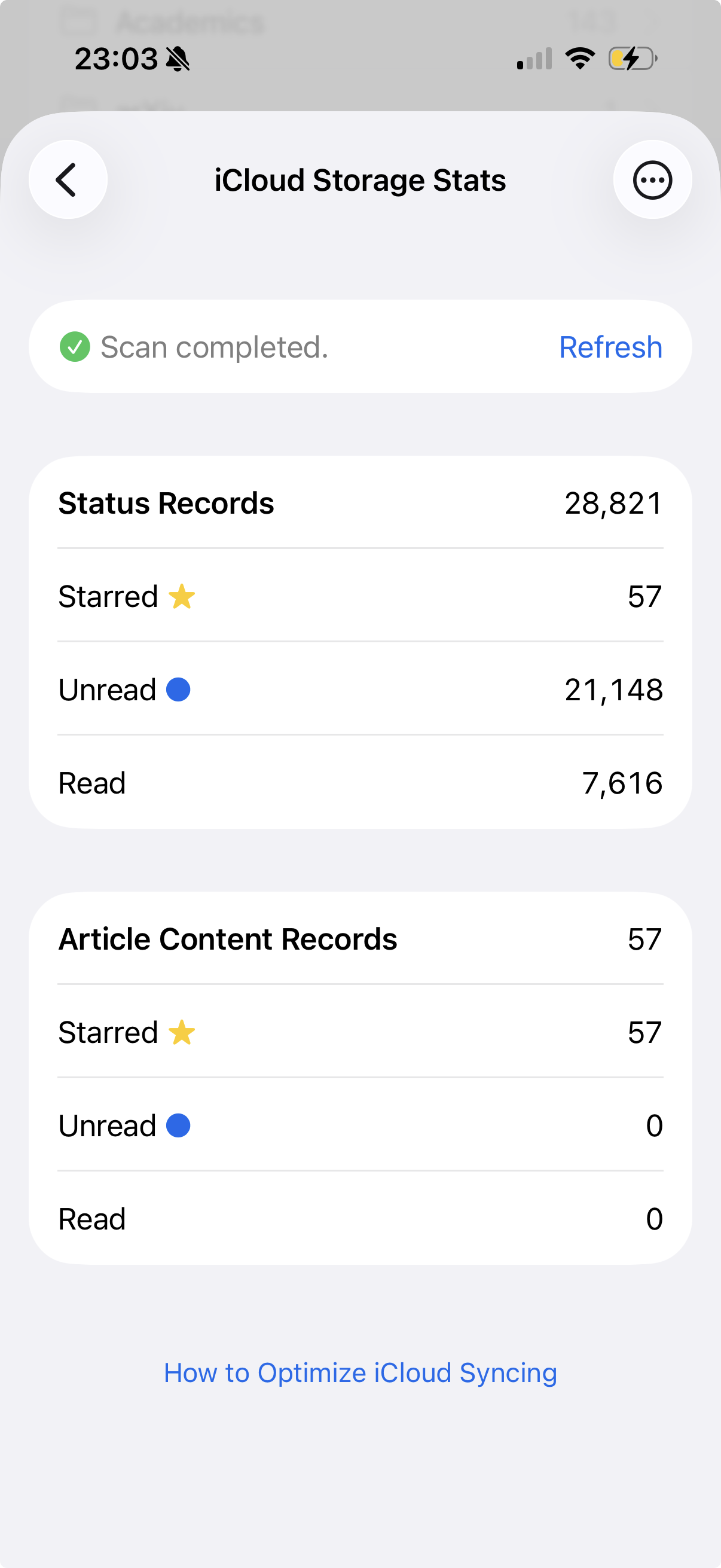
NetNewsWire 7.0.4b2 for Mac brings another new troubleshooting feature: a window to show your iCloud storage stats plus a Clean Up button. Details and instructions are here:
This feature will be coming to iOS too, of course, in a follow-up.
I think this will make a huge difference for people using iCloud syncing. So please check it out, report any bugs, let me know what you think, let me know if it helps. Thanks!
Thank you for the great new feature. I think it improves performance and reduces sync activity.
I use NNW on four devices: three of these run the latest versions of macOS and iOS, as well as the NNW v7 beta, while my iPad runs iPadOS 17.7.10 and NNW 6.2.1. Does using both versions of NNW affect the iCloud sync (read, unread, synced, etc.) in a negative way?
I have testflight/beta NNW running on two macs, an iPhone and and iPad, all running 26.4.
I have turned off unread syncing on all devices and run the cleanup.
Now, feed downloading seems to be fine on the Macs, but not on the iPad and iPhone — it doesn’t successfully refresh when I “pull down”. The Macs show much newer articles than the iOS/iPadOS devices.
@clausimausi Using both versions of NetNewsWire is fine. You might want to check your iCloud Storage Stats every few months and see if it can use a cleanup, but that’s it.
The iPhone and iPad error logs just shows inaccesible feeds that are still in my list. They’re all of this form, and these are the only things in the log, so I don’t think it helps diagnose the problem.
I’ve also tried removing and replacing the iCloud account and, after that didn’t work, deleting and replacing the app on the iPhone. No luck. The on-device feeds sync fine. The iCloud feeds show up in the feed list but are empty.
On iPad, things are better (without either of the attempted remedies above) — they do appear to be syncing although it perhaps takes time to “catch up” with the latest feeds.
So maybe the only real problem is with my iPhone? Is there anything brittle in the new setup or the cleanup procedure that could “orphan” a device? (Probably due to some sort of user error on my part during the process?…)
I’m currently experiencing an ongoing issue with the unread count not syncing correctly between my Mac and iPhone.
Environment Details:
macOS: NNW Version 7.0.4b3 (Build 7040) | Unread Count: 433
iOS: NNW Version 7.0.4 (Build 7040) | Unread Count: 375
OS Version: Public 26.4 on both devices
Symptoms:
The iOS app Unread Count is consistently behind the macOS app.
The “Last Updated” timestamp on iOS is occasionally inaccurate (e.g., displaying “Updated 9 hours ago” when the last update was actually a few minutes prior).
Troubleshooting Steps Taken:
Checked iCloud Storage Stats: Ran on both devices; the numbers match exactly.
Toggled Settings: Turned off “Article content sync” on both devices.
Nuked the Sync: Completely removed iCloud, deleted all iCloud data, and started a fresh sync on both devices with article content sync turned off.
Reset Unread Status: Marked all content as read on both devices. The counts matched initially, but the mismatch returned after a few hours.
… and now the phone seems to be catching up! I don’t know if this is a backend change or just something related to how syncing and feed reading works now…
If you did an iCloud storage Clean Up, it means that there may be a bunch of deletions that need to be synced. Once that completes, then everything should catch up. Sounds like that’s what probably happened in your case.
@defjaf I think this was the issue of the deletions needing to be synced first (the deletions from the iCloud clean). Once that’s done, all should be faster.
Thank, @brent. But I am still a bit confused: right now, the Macs are completely up to date. An hour ago, the iPhone and iPad were only showing feeds from the day before, and nothing would change when I pull-to-refresh. Now, the iPad has updated at least some of the feeds, but the iPhone is still stuck with its feeds last updated about 24 hours ago.
Is all this expected/understood behavior that will eventually clear up (it’s been a few days already)?
@defjaf It sounds like the iPhone is still doing the post-cleanup sync.
I just released build 7041 which I recommend installing asap. It adds incremental iCloud syncing, which should make it easier for your iPhone to catch up.
Is there any way to get a feeling for how long it should take to get cleaned up, or to actively speed it up? We are on the better of a week since the update and right now the iPhone version (just updated to 7044) last got new feeds more than 24 hours ago, whereas both the macOS and iPad versions seem caught up.
With the latest version, there is one more error (having to do with the sync stats) and a little more info in the log. No new errors associated with syncing; no new articles since 30 March.
[2026-03-30 18:52:08] iCloud — Sending article status:
The operation couldn’t be completed. (CKErrorDomain error 4.)
(Account/CloudKitSendStatusOperation.swift:processStatuses(_:):105)

[2026-04-01 23:01:42] iCloud — Fetching iCloud stats:
The operation couldn’t be completed. (Swift.CancellationError error 1.)
(Account/CloudKitAccountDelegate.swift:fetchCloudKitStats(progress:):507)
P.S. minor feature request: selectable text in the log!